Talk to your files. Keep them yours.
FileWhisper reads your PDFs, notes and scanned documents and answers questions about them, entirely on your computer. The AI model runs there too, so nothing is uploaded and there is no account and no API key.
Your IndiGo flight 6E798 from Indore to Kolkata departs at 8:30 PM on 2 July 2026 and arrives at 10:40 PM. Check-in closes 45 minutes before departure, so make sure you’re at the counter by 7:45 PM.
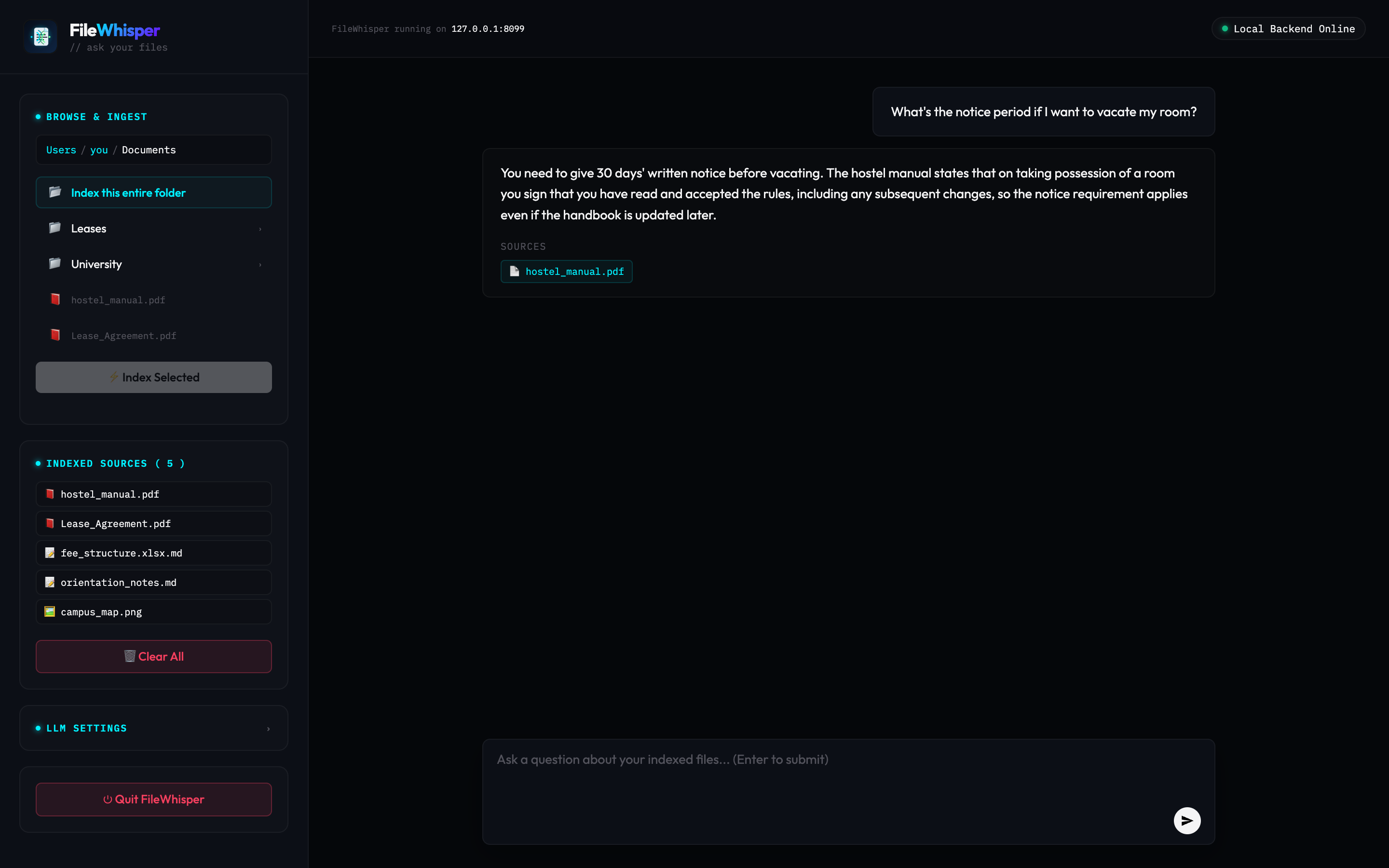
The actual app: a clean local web page that opens in your browser. Answers read like a conversation and cite the files they came from.
Free, no API key needed. Works offline · macOS, Windows & Linux · open source.
From folder to answers in one minute.
Watch FileWhisper index a folder of PDFs and scans, then answer questions with citations.
Three steps. Then never the terminal again.
Open your terminal
On a Mac, press Command + Space, type “Terminal”, and hit Enter.
TerminalPaste one line
Paste the install command from above and press Enter. It sets everything up and adds a FileWhisper icon to your Desktop.
Open & ask
Double-click FileWhisper. It opens in your browser. Pick a folder, then just type your question in plain English.
Private where the others upload.
Cloud tools make you upload your documents to someone else's server. FileWhisper keeps everything on your machine.
| FileWhisper | ChatGPT / ChatPDF uploads | NotebookLM | |
|---|---|---|---|
| Where your files go | Stay on your computer | Uploaded to the cloud | Uploaded to Google |
| Account needed | None | Yes | Google account |
| Cost | Free & open source | Free tier, then paid | Free, usage limits |
| Scanned pages & photos (OCR) | Built in | Varies by plan | Limited |
| Cites the exact source file | Every answer | Sometimes | Yes |
| Choice of AI model | Any provider, or the free built-in one | Fixed | Fixed (Gemini) |
Runs on your computer. Faster with your own key.
FileWhisper works the moment you install it, with an AI model that runs on your own machine. No signup, no key, no network. Want quicker, sharper answers? Add an API key from any major provider. It’s completely optional, and it’s saved on your computer and used directly.
Just install and ask
A small AI model is installed alongside FileWhisper and answers on your own machine. Your questions and your documents never go anywhere.
- Zero setup, zero cost
- Works with the Wi-Fi off
- Nothing to sign up for
Faster & more accurate
Paste a key from any provider (Groq, OpenAI, Claude, Gemini, or any OpenAI-compatible API) in the LLM Settings panel for noticeably quicker, sharper answers. Totally optional.
- Use any LLM you like
- Snappier, more accurate replies on long documents
- Every answer is labelled, so you always know when one left your machine
Private by design, simple by default.
100% local
Indexing, search, OCR and the AI model itself all run on your machine. Files never leave your computer.
No setup headaches
One command. No Docker, no databases, no Python wrangling. Small install, no PyTorch.
Reads almost anything
PDFs, text and Markdown, plus scanned pages and images via built-in OCR.
Always cites sources
Every answer shows exactly which of your files it came from, so you can trust it.